DAKboard vs Skylight vs DinkyDash (2026): Prices, Setup, and Which to Pick
Comparing the two best-known ways to put your family's calendar on a wall? Here's the short version.
DAKboard is software you point at a screen you already own. Skylight is a screen you buy, with the software already in it. That single difference decides most of it: DAKboard costs nothing up front and $0–10 a month; Skylight costs $299.99–$599.99 once and $0–79 a year after that.
DinkyDash — our project — is a third shape: open source and bring your own screen. It's free if you run it yourself, or $39 a year if we host it. We're obviously not neutral about that one, so this page is written to be useful even if you pick one of the other two.
A word on what this page is. It compares published specifications and public prices, checked on 9 October 2026. It's not a review — we haven't lived with a Skylight on our kitchen wall, and we aren't going to pretend otherwise. For hands-on impressions of the hardware, go and read the people who actually bought one.
Head to head
| DAKboard | Skylight Calendar | DinkyDash | |
|---|---|---|---|
| Screen | Bring your own, or their CPU from $99.95 | Included — 15″ or 27″ touchscreen | Bring your own |
| Hardware cost | $0–100 | $299.99 (15″ Calendar 2) / $599.99 (27″ Calendar Max) | $0, or ~$120–185 for a Raspberry Pi build |
| Subscription | Free tier; Essential $6/mo ($5 annually); Plus $10/mo ($8 annually) | Optional Plus, $79/yr | None self-hosted. Hosted trial free, then $39/yr or $6/mo |
| Calendars it reads | Google, iCloud, Microsoft 365, Facebook Events, ICS files | Google, Apple and Outlook | Google, iCloud and Outlook — you paste a sharing link, there is no sign-in |
| Open source | No | No | Yes, MIT |
| Runs on your own hardware | The display does; the service does not | No | Self-hosted: yes, entirely. Hosted: runs on ours. |
| Chore chart | Yes — on Essential and Plus, not free | Yes; rewards need Plus | Yes, free — rotates between kids automatically |
| Touchscreen | Only if the screen you bring is one | Yes, built in | Only if the screen you bring is one |
| AI | No | Magic Import on Plus — photograph a school newsletter, get events | A daily headline written fresh each day |
| Setup | About ten minutes | Out of the box | Hosted: about five minutes. Self-hosted: an afternoon, and some comfort with a terminal. |
Prices checked 9 October 2026; the Raspberry Pi build is approximate and was last priced August 2026. Always confirm current pricing before buying.
What each one actually is
DAKboard — a dashboard you compose
DAKboard grew out of the Raspberry Pi community and has been the default answer for wall displays for years. You build a layout in their web editor — calendar, weather, photos, news, sports, whatever — and point any browser at the resulting screen URL. It runs on a TV, a tablet, an old monitor, or their own plug-in CPU.
The thing to check before you start is what the free tier actually is. It gives you one predefined screen and two calendars, with predefined layouts only, DAKboard branding on the display and a 60-minute calendar refresh. Custom layouts — the feature DAKboard is known for — begin on Essential at $6/month, or $5/month billed annually, which also lifts you to two screens and five calendars. Plus, at $10/month or $8 annually, is where three screens, unlimited calendars and a 15-minute refresh live.
DAKboard does now market a chore chart: a column per family member, one tap to check something off, points that convert into rewards you set, and a child lock so siblings can't clear each other's lists. It's on Essential and Plus, not the free tier.
The product underneath is still an information dashboard, though. It's very good at arranging many data sources on one screen, which means "whose turn is it to feed the dog" is a general tool pointed at a specific job.
Skylight Calendar — a finished object
Skylight sells the screen. The 15″ Calendar 2 is $299.99 and the 27″ Calendar Max is $599.99, in both cases a wall-mountable touchscreen that merges your Google, Apple and Outlook calendars into one big colour-coded family view. There's nothing to build.
The optional Plus subscription is $79/year. A Skylight works without it — the core calendar and the chore chart are there — but Plus is where chore rewards, meal planning and Magic Import sit. Our breakdown of what Plus actually covers goes through it line by line.
What you're paying for is that a family can walk up and tap it. No other option here gives you that unless the screen you already own happens to be a touchscreen.
DinkyDash — open source, free to self-host or $39 a year hosted
DinkyDash turns any TV, tablet, Raspberry Pi or spare monitor into a family calendar: today's events, a chore chart that rotates between kids automatically, countdowns to birthdays and holidays, and a daily headline written by AI each day around the family's actual day.
It reads the calendars you already keep — Google Calendar, Apple iCloud and Outlook all publish a sharing link, and DinkyDash merges as many as you like into one agenda in time order. That's a link, not a login: it never signs in to your Google, Apple or Microsoft account, and it can only read. The getting started guide has the steps for each of the three.
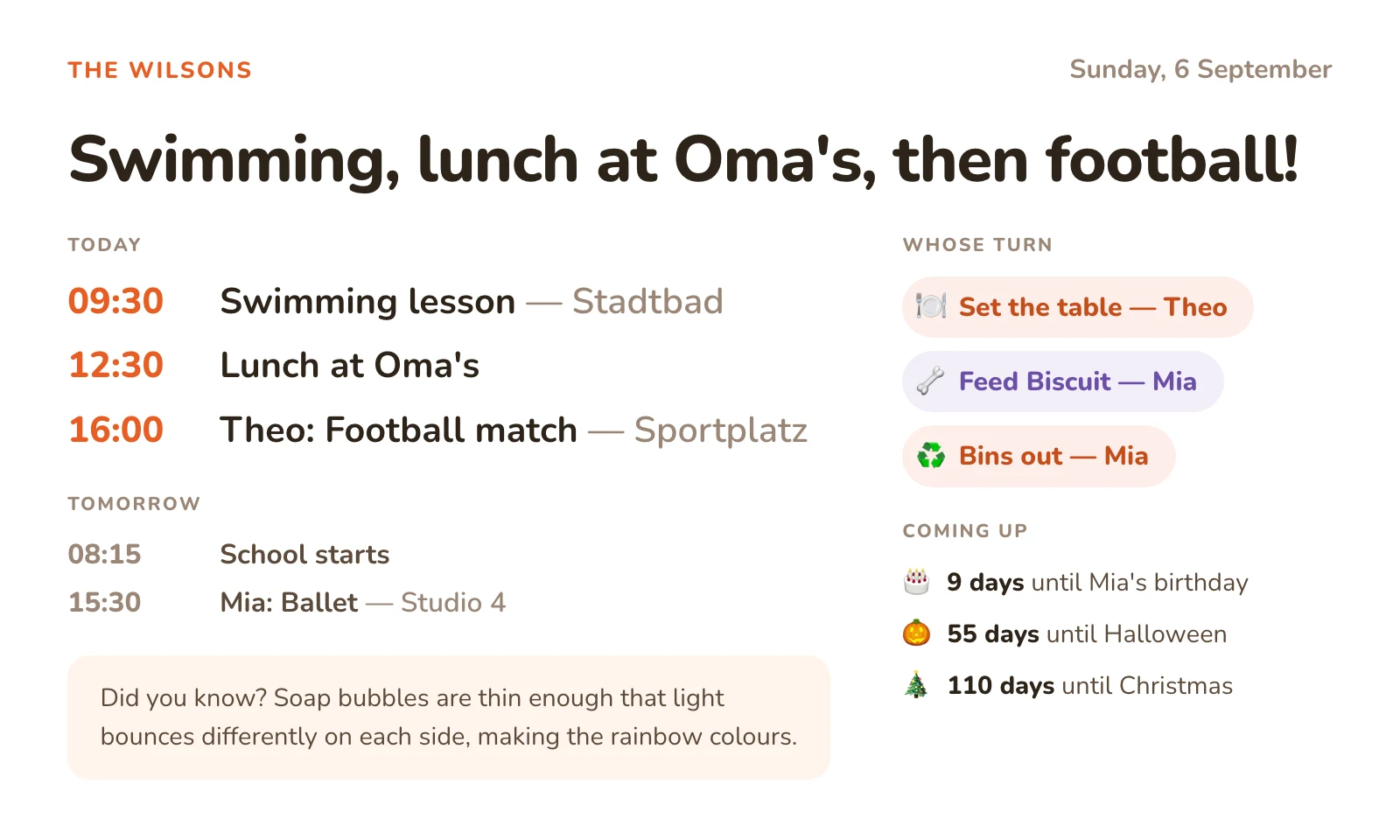
It's MIT-licensed and free forever if you run it yourself — no paid tier, no screen limit. Your config, the names and the birthdays stay on your own machine. To be precise about the one thing that leaves: the day's agenda is sent to Anthropic once a day to write the headline, and that's the only outbound call besides fetching your calendars.
The honest cost is time, not money. Setup is an afternoon and some copy-paste in a terminal — the getting started guide has the commands. The only running cost is your own Anthropic key for the daily headline, about $0.13 a month.
For the same dashboard without the terminal, start a free 14-day hosted trial, with no card required. After that it's $39 a year or $6 a month, and nothing is charged unless you choose to subscribe.
What three years actually costs
Annual billing where it's offered. The DAKboard and DinkyDash rows assume you already own a screen; if you don't, the hardware column is where that shows up.
| Hardware | 3 years of software | 3-year total | |
|---|---|---|---|
| DinkyDash, self-hosted | $0 (own screen) or ~$120–185 (Pi build) | ~$5 | ~$5–190 |
| DinkyDash, hosted | $0 | $117 at $39/year | $117 |
| DAKboard Essential | $0, or ~$100 for their CPU | ~$180 | ~$180–280 |
| DAKboard Plus | $0, or ~$100 | ~$288 | ~$288–388 |
| Skylight 15″, no Plus | $299.99 | $0 | ~$300 |
| Skylight 15″ + Plus | $299.99 | $237 | ~$537 |
| Skylight Max + Plus | $599.99 | $237 | ~$837 |
Prices checked 9 October 2026; the Raspberry Pi build is approximate and was last priced August 2026. Always confirm current pricing before buying.
The interesting row is the fifth one. A Skylight without Plus is a genuinely competitive three-year cost — cheaper than DAKboard Plus, and you get a touchscreen for it. The $837 figure people quote is the 27″ model with the subscription, which is the most expensive way to buy Skylight rather than the only way.
Setup effort, honestly
- Skylight: minutes. Unbox, connect to Wi-Fi, sign in to your calendar accounts. This is the whole point of buying hardware.
- DAKboard: about ten minutes, plus whatever time you spend fiddling with the layout, which for some people is the hobby rather than the cost. Point a browser at a URL and you're done.
- DinkyDash: five minutes, or an afternoon. Hosted, you paste a calendar link and open the dashboard on your screen. Self-hosted, you install Python, get an Anthropic API key and set it to run on a schedule. Nothing is hard, but the self-hosted path is a terminal, and if that sentence made you tired then the hosted one is yours. Our DIY guide walks through the Raspberry Pi version.
What happens when it breaks
Nobody puts this in a comparison table, and it's the difference that lasts longest.
DAKboard. The display renders on your screen but the service runs on their servers. If DAKboard has an outage, your wall shows a stale screen or nothing, and there's no local fix — you wait, and you file a ticket. In exchange, there is a ticket to file: a company, a support queue and an uptime record.
Skylight. Hardware fails, and Skylight's answer is a warranty claim and a replacement unit. That's a real, staffed process, which is more than you get from a self-hosted anything. The longer-term exposure is the same shape as DAKboard's: the screen needs their service to be useful, so it's worth remembering you're buying a subscription to a company as much as a piece of glass.
DinkyDash. You're the support queue. Self-hosting is community-supported — issues are welcome on GitHub, and nobody is on call. Against that, three things are true and are the reason some people choose it anyway:
- A failed run doesn't blank the wall. If the daily job fails, the dashboard still shows today's times, chores and countdowns, because those are recalculated from your config every time the page renders. The headline is one worked out from the day, and the dashboard says so rather than leaving yesterday's headline up. Yesterday's calendar fetch reached 14 days ahead, so today's agenda is still in it.
- The company can't take it away. It's MIT-licensed and installed on your machine. A copy you already have keeps working regardless of what happens to us.
- The failure modes are yours to fix. SD card, Wi-Fi, a Python version — annoying, but visible, and you own them.
That's the actual trade: a support queue you can't influence, or no support queue and no dependency.
Where Mango Display fits
Two of the three products above are bring-your-own-screen, so the natural fourth name is Mango Display — and "Mango Display vs DAKboard" is a comparison people search for on its own.
The short answer: Mango is the polished, no-setup version, and its free plan doesn't include the calendar. The free tier gives you two screens with a clock, weather, news headlines, background images and quotes. Calendars — along with chores, meal plan and photo widgets — start on Pro at $5.99/month or $59.99/year. That's comparable to DAKboard Essential in price, but the products differ in shape: DAKboard goes much further on custom layouts, and Mango asks far less of you to get something on the wall.
Against DAKboard specifically: pick DAKboard if you want to control the layout, and Mango if you want an app on a Fire TV and no configuration at all. Neither is open source, and both keep your data on their servers. Our DAKboard alternatives page covers Mango, MagicMirror² and Home Assistant in more detail.
Where each one genuinely wins
A comparison that only flatters its own product isn't worth reading, so:
DAKboard wins on layout control and breadth. Custom layouts and CSS styling, and calendars, photos, weather, news, sports, stocks and smart-home feeds all on one screen. Multiple screens showing different things is built in. If your wall display is a hobby, DAKboard is the better hobby.
Skylight wins on "it's finished". A touchscreen your family taps, a solid companion app, a support line, and a setup measured in minutes. If the real goal is that everybody sees the calendar and nobody has to be the household IT department, buying the problem away is a legitimate answer — and without Plus it's not even expensive over three years.
DinkyDash wins on cost, ownership and the daily headline. Free to self-host or $39 a year hosted, with a headline each day that neither of the others offers. It's the only one here you can read the source of, and the only one you can keep running yourself if we stop.
Which should you pick?
- You already own a screen and enjoy configuring things: DAKboard, and budget for Essential rather than the free tier if you want custom layouts.
- You want a touchscreen and no project: Skylight — start with the 15″ and skip Plus until you know you want meal planning.
- You want $0, the source code, and a calendar that's family-shaped out of the box: DinkyDash, self-hosted.
- You want the DinkyDash dashboard without the terminal: start a free 14-day hosted trial — no card required.
- You want something on the wall today with no configuration: Mango Display Pro — budget for Pro, not the free tier, which has no calendar.
- Mornings are the actual problem, not the calendar: neither of these. See Hearth vs Skylight.
Still deciding whether a wall display is worth it at all? Prop an old tablet on the kitchen counter for two weeks first. Our DIY guide explains why that test tells you more than the hardware decision does. Or compare the wider field on the Skylight alternatives and DAKboard alternatives pages.
Last updated 2026-11-04.