DIY Skylight Calendar: Build a Digital Family Calendar for $120–185
A Skylight Calendar Max costs $599.99, plus $79 a year if you want the Plus features. The thing is, a digital family calendar is fundamentally a screen showing a web page — and that's something you can build yourself for about $120–185 with a Raspberry Pi, or for $0 with a tablet you already own.
Here's exactly how, using DinkyDash, our free and open-source family calendar software.
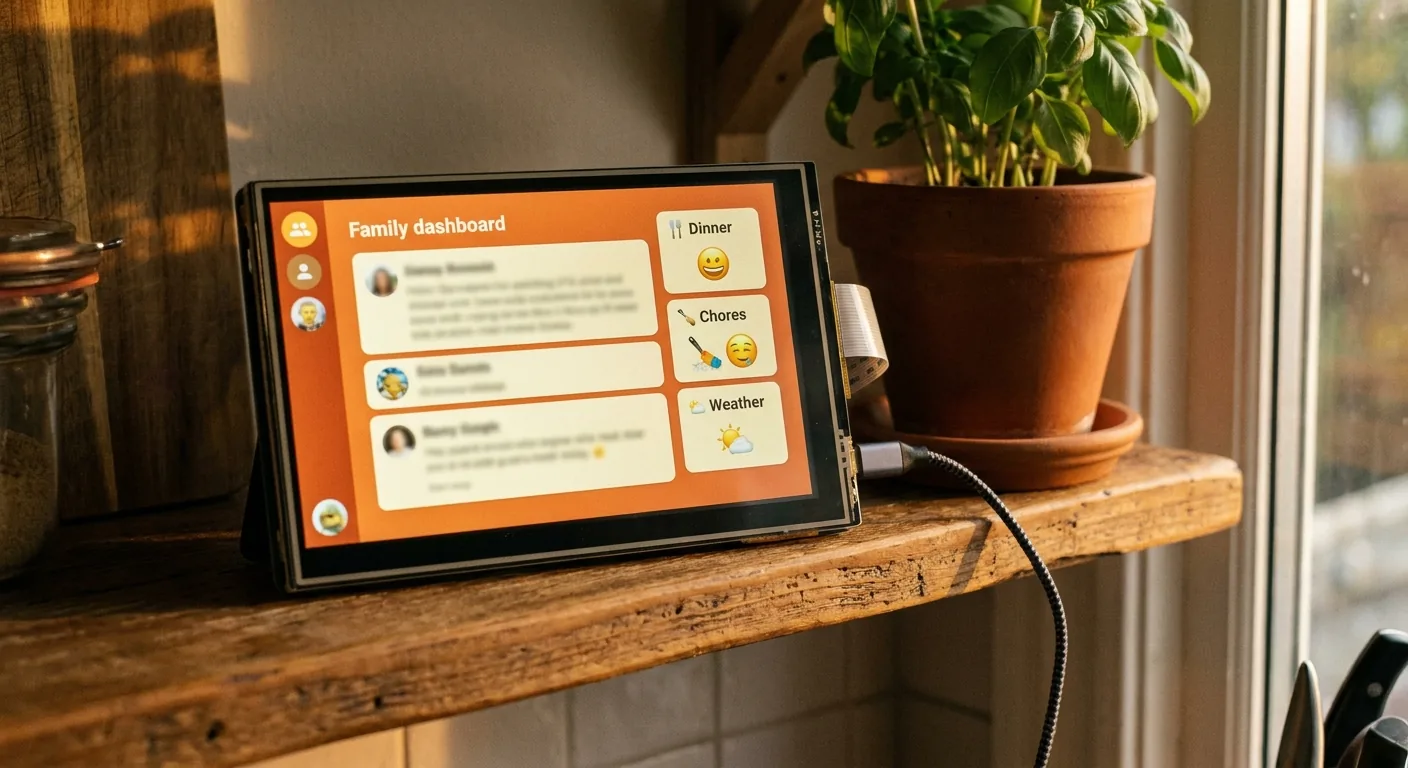
What you get
Your DIY calendar shows everything on one glanceable screen, refreshed automatically:
- Today's events from Google Calendar (or any calendar with an iCal link)
- A chore chart that rotates between kids automatically every day
- Countdowns to birthdays, holidays and the dates everyone keeps asking about
- A daily message written by AI — a fresh headline every day, written around your family
That last one is something even the $600 hardware doesn't do.
Want to see the countdown part before you build anything? Our birthday countdown runs in a browser tab, free and without a sign-up.
The hardware: three routes
| Route | What you need | Cost |
|---|---|---|
| Old tablet | The iPad or Android tablet in your drawer + a stand or wall mount | ~$0 |
| Raspberry Pi build | Pi 4 or 5, 7″ touchscreen, SD card, power supply | ~$120–185 |
| Spare monitor or TV | Any screen with a browser, or one connected to any computer | ~$0 |
The Raspberry Pi route is the classic: it draws well under 10 watts, mounts cleanly on a wall or shelf, and boots straight into the dashboard in kiosk mode. Our Raspberry Pi family calendar guide covers which Pi and screen to buy, with a full parts list.
The old-tablet route is the fastest way to find out whether your family will actually use a wall calendar — and that's the real question, not which hardware to buy.
Start with the screen you already own
Before spending anything, prop up an old tablet or spare monitor in the kitchen and run the dashboard on it for two weeks.
This sounds like a hedge, but it's the single most useful thing you can do. A family calendar only works if it's somewhere everyone walks past at the right time of day, and you will almost certainly get that spot wrong on the first try. Finding out with a tablet on a cookbook stand costs nothing. Finding out after mounting a Pi behind drywall is annoying.
If it sticks, buy the hardware. If it doesn't, you've lost an evening instead of $600.
The build, in five steps
The full getting-started guide has copy-paste commands for every step. The short version:
- Install DinkyDash — clone the repo, install Python dependencies (about 10 minutes).
- Describe your family — one config file with names, birthdays, chores, special dates, and your Google Calendar's iCal link (or iCloud's, or Outlook's).
- Add an Anthropic API key — this powers the AI-written headline. It comes to about $0.13 a month.
- Set it to run on its own: one command from the setup guide has it check every five minutes.
- Point your screen at it — on a Pi, Chromium launches fullscreen at boot; on a tablet or TV, just open the dashboard URL in the browser.
Realistically: an evening for the first build if you're comfortable in a terminal, and about ten minutes whenever you want to change a chore rotation afterwards.
Mounting it on the wall
Three things decide whether this gets looked at:
- Height and place. Eye level, on the route between the coffee machine and the door. Kitchens beat hallways; hallways beat home offices.
- Power. This is the part people underestimate. A wall-mounted screen needs a cable to somewhere, and the honest options are a nearby outlet, a surface-mounted cable channel, or a shelf instead of a wall. Pick the spot with power in mind rather than solving it afterwards.
- Glare. A screen facing a window is unreadable for two hours a day. Turn it perpendicular to the light.
A cheap tablet wall mount, a picture ledge, or a small easel stand all work. None of this needs to be permanent — and it shouldn't be, until you're sure about the location.
DIY vs Skylight, honestly
What you give up: the slick touch interface for editing events on the screen itself (you edit in Google Calendar instead), the polished companion app, and someone to email when things break.
What you gain:
| Skylight Calendar Max | DIY with DinkyDash | |
|---|---|---|
| Hardware | $599.99 | $0–185 |
| Subscription | $79/yr for Plus features | None; about $0.13 a month for the headline |
| Three-year cost | ~$837 | ~$5–190 |
| Your data | Their cloud | Your device |
| AI daily message | No | Yes |
| Fixable/customizable | No | It's your code |
Skylight prices checked 9 October 2026; the Raspberry Pi part prices above are approximate and were last checked August 2026.
Questions people ask
Is there a monthly fee for a DIY calendar? No subscription if you run it yourself. The only running cost is the Anthropic API key for the headline, which comes to about $0.13 a month. Skip the AI headline and it's free. (For what Skylight itself charges, see our Skylight subscription breakdown.)
Do I need to know how to code? No, but you need to be willing to copy commands into a terminal and read an error message without panicking. If you've ever followed a Raspberry Pi tutorial, you're comfortably over the bar. If the word "terminal" is a dealbreaker, buy the Skylight — that's a legitimate answer.
What actually goes wrong? Two things, both fixable in a minute. Chromium sometimes starts before the server is ready and shows a connection error at boot — the startup script waits for the server to fix this. And emoji render as empty boxes until you install the emoji font package. Both are covered in the troubleshooting section.
What happens if the internet goes down? The screen doesn't go blank. Whose turn it is and the countdowns are still today's, because they're worked out from the date. The agenda comes from the last calendar fetch, which reaches two weeks ahead. If the headline couldn't be written, the dashboard shows one worked out from the day and says so.
Can the kids break it? There's nothing to tap. It's a read-only display — events are edited in Google Calendar on your phone, so there's no way to delete next week from the wall.
Is DIY actually worth it versus just buying one? If your time is worth more than about $500 an evening, no. If you already own a spare screen, enjoy this sort of project, or specifically want your family's data staying on your own hardware, yes. Both are reasonable — see all the Skylight alternatives including no-setup options.
What about DAKboard or MagicMirror²? Both are established ways to put a dashboard on a wall, and both are worth a look if you want more layout control than DinkyDash gives you. The short version: MagicMirror² is free and open source but starts as a blank frame, and DAKboard is polished but is a paid hosted service rather than something you self-host. We compared all of them on the DAKboard alternatives page.
Start here
If you can copy commands into a terminal, you can have this on your kitchen wall by Sunday: the complete setup guide. Buying hardware for it? Start with the Raspberry Pi build guide.
Rather skip the setup entirely? Start a free 14-day hosted trial, no card required.
Last updated 2026-10-09.